eufy cameras have become a favourite in UK homes because they offer smart features without asking for a monthly fee. Most eufy cameras store footage on the camera or on a HomeBase indoors, so your recordings stay at home.
This guide explains the range of eufy models simply and recommends six for different spots: wire-free and solar cameras for outside, a floodlight camera for the drive, and a gentle indoor camera.
The short answer
- Easiest start SoloCam S220: wire-free with storage built in.
- Best outdoor SoloCam S340: dual cameras and solar.
- Drive or garage Floodlight Camera E340 with 24/7 recording.
- Indoors Indoor Cam C220 is excellent value.
In this guide
How eufy cameras store your footage
There are two ways eufy models keep recordings. SoloCam models have storage inside the camera, which is simple and needs nothing else. eufyCam systems use a HomeBase, a small hub indoors that stores footage from several cameras and can be expanded. A HomeBase is the calmer option if you’re worried about a camera being stolen, because the footage stays inside.
Our 6 eufy cameras picks

2K with built-in storage
The SoloCam S220 is a simple wire-free outdoor camera with 4GB of storage built in, so you can start without a HomeBase or subscription. It records 2K and can join a HomeBase 3 later.
- Nothing else to buy
- Wire-free
- No monthly fee
- Modest built-in storage
- 2.4GHz only

Solar camera that follows movement
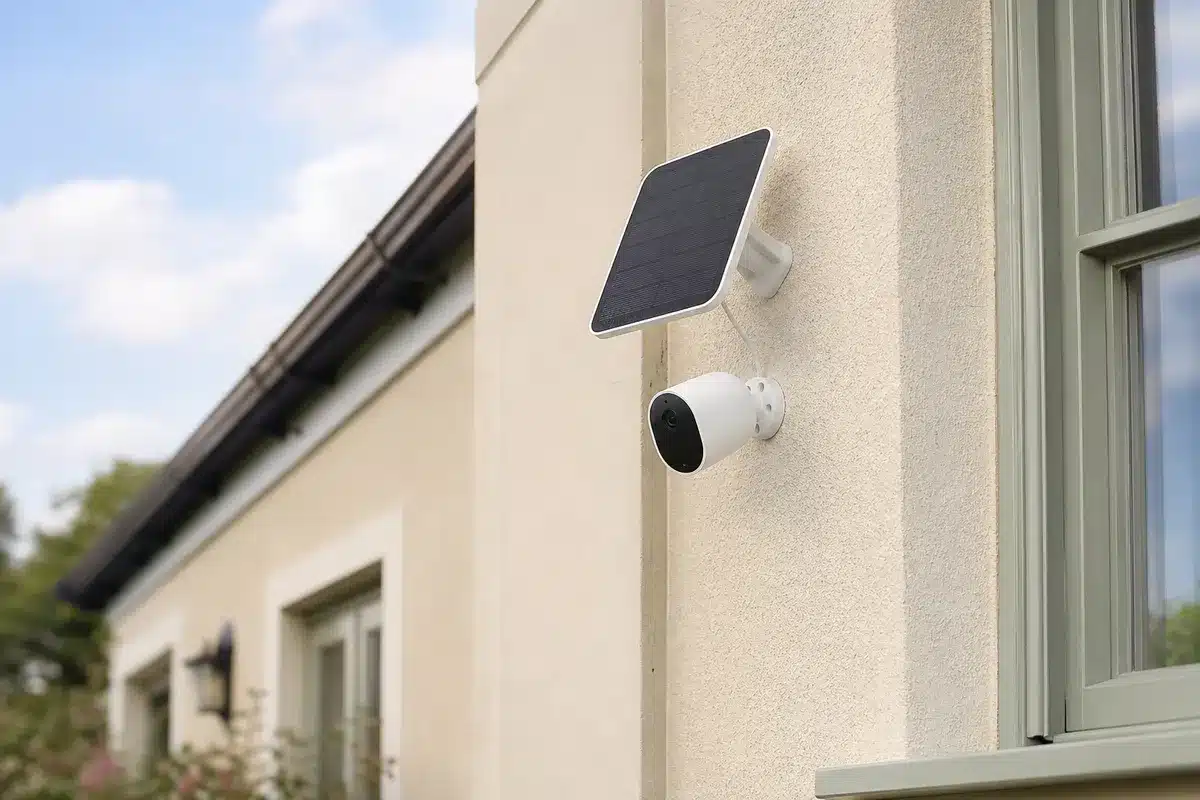
The C37 is a solar-powered outdoor camera that pans and tilts to track movement across your garden or drive. A tidy way to cover a wide area with one camera.
- Covers a wide area
- Solar keeps it charged
- AI tracking
- Needs a sunny position
- Bulkier than fixed cams

Dual cameras with solar
The S340 combines a wide-angle and a telephoto camera with a built-in solar panel and 360° coverage, so you can see the whole scene and zoom into details.
- Wide and zoomed views
- Built-in solar
- No monthly fee
- Pricier
- Large unit

Bright lights and 24/7 recording
A wired floodlight camera with dual cameras, pan and tilt, 2,000-lumen floodlights and 24/7 recording. It needs mains power, so use an electrician if you’re not confident.
- Lights deter visitors
- Continuous recording
- No monthly fee
- Needs mains wiring
- Large on the wall

Affordable 2K pan and tilt
An affordable indoor camera that pans and tilts 360°, with AI to spot people and motion. Lovely as a pet or baby camera too.
- Very affordable
- Whole-room view
- Doubles as pet cam
- Indoor only
- Needs a socket

Local storage for all your eufy cameras
If you’re building a eufy system, the HomeBase S380 keeps recordings indoors with expandable storage and handles smart features locally.
- Keeps footage safe indoors
- Huge expandable storage
- Links many devices
- Upfront cost
- eufy devices only
Choosing between eufy cameras
| Need | Our pick | Power |
|---|---|---|
| Quick, simple outdoor camera | SoloCam S220 | Battery |
| Whole garden in one camera | eufyCam C37 or SoloCam S340 | Solar |
| Driveway with lighting | Floodlight Camera E340 | Mains |
| Inside the home | Indoor Cam C220 | Plug-in |
| Several cameras, one hub | HomeBase S380 | Mains |
A note on privacy and security
As with any smart camera, use a strong, unique password and two-factor sign-in on your eufy account, and keep the app and firmware updated. Use privacy zones so eufy models don’t record neighbours’ windows or gardens; our home CCTV law guide explains why. For the bigger picture across brands, see our guide to the best home security cameras.
If you already have a eufy doorbell, see our guide to the best eufy doorbells too, as many work with the same HomeBase. The eufy UK website lists which cameras each HomeBase supports.
Solar or battery?
Many eufy models offer solar options, either with a separate panel or one built into the camera. Solar is wonderful on a sunny wall, as you’ll rarely need to charge the camera. On shady, north-facing walls, a battery camera you charge every few months, or a wired camera, may be more dependable. Look at where the sun falls on your home before choosing.
Local AI and fewer false alerts
eufy’s smarter cameras and HomeBases can recognise people, vehicles and pets on the device itself, without sending video to the cloud. That means fewer alerts about swaying branches and more about the things that matter. You can also set activity zones so only movement on your path or drive triggers a notification.
How many eufy cameras do you need?
Most homes start with one camera covering the front door or drive, often alongside a video doorbell. A second camera at the back or side gate completes a simple, reassuring setup. Indoor cameras are optional and best used thoughtfully. Because eufy models don’t need a subscription, adding another camera doesn’t increase your monthly costs.
Looking after your cameras
Wipe lenses and solar panels a few times a year, check batteries before winter and keep firmware updated in the app. These small habits keep eufy models working quietly in the background for years.
Indoor eufy cameras and privacy
eufy’s indoor cameras include privacy features such as modes that switch recording off when you’re home. Use them in shared spaces like hallways, avoid bedrooms and bathrooms, and let everyone at home know where cameras are.
eufy cameras: FAQs
Do eufy cameras need a subscription?
No. eufy models store footage locally on the camera or a HomeBase. Optional cloud plans are available.
Do I need a HomeBase for eufy cameras?
Not for SoloCam models, which have built-in storage. eufyCam systems use a HomeBase.
Are eufy cameras good in the dark?
Most offer colour night vision or infrared, and floodlight models light the scene for clearer colour footage.
Can eufy cameras record 24/7?
Battery models record events to save power. Wired models like the Floodlight E340 can record continuously.
The bottom line
- No monthly fee needed
- HomeBase keeps footage indoors
- Use privacy zones considerately
eufy models are a great choice for no-fee home security. Start with a SoloCam S220 for simplicity, the S340 for the best outdoor coverage, or a HomeBase system if you plan several cameras.
General information only. Features, prices and availability change, so always check the product listing and your manufacturer’s instructions. If a job involves your car’s electrics or mains wiring and you’re not confident, please ask a qualified installer.